
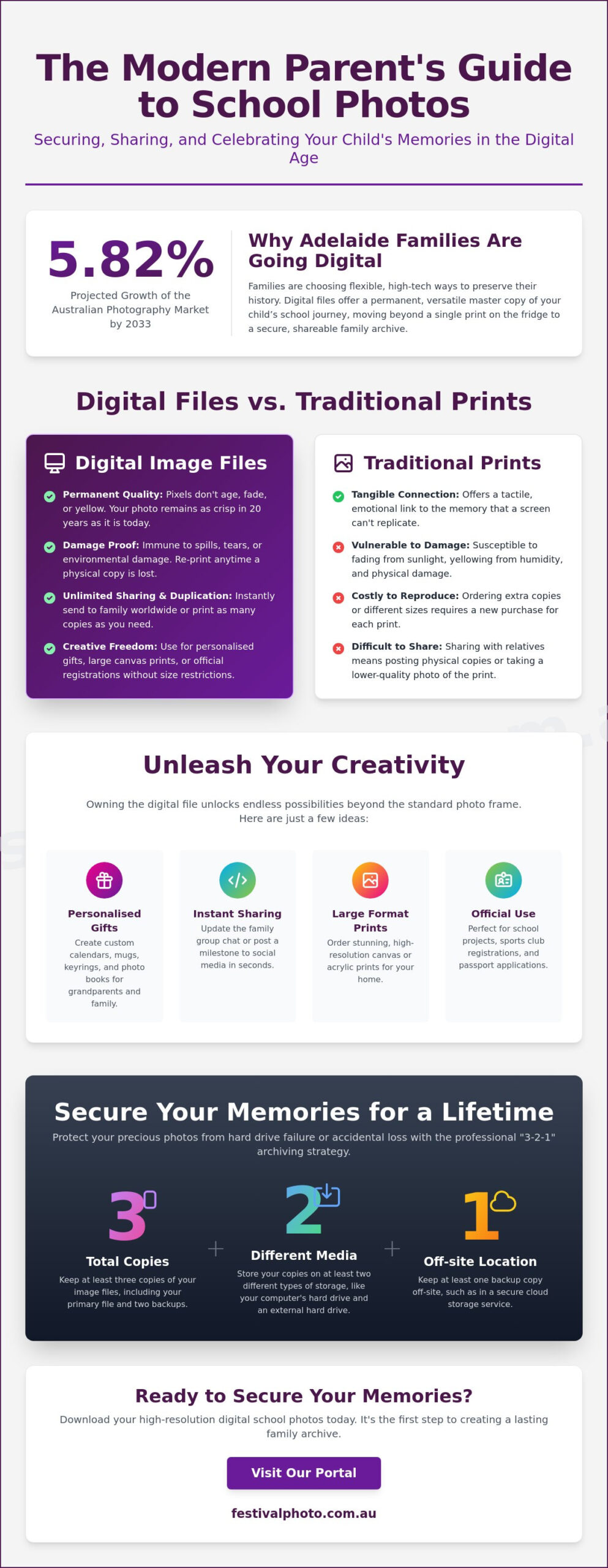
What if the most enduring record of your child’s school years isn’t the physical print on the fridge, but a versatile file that lives safely on your devices? While traditional prints hold a special place in our hearts, many parents are now prioritising digital image files for school photos to ensure their memories are safe from accidental damage or fading. It’s natural to feel protective over these milestones; after all, these images capture a narrative of growth that you can’t get back. With the Australian photography services market expected to grow by 5.82% through 2033, it’s clear that families are moving toward more flexible, high-tech ways to preserve their history.
We understand the frustration of complex ordering systems or the worry that a technical glitch might erase years of smiles. You want a reliable way to keep those memories accessible and crisp. This guide will show you how to master your digital downloads, from securing high-resolution prints to building a permanent, shareable archive. We’ll explore how to organise your files for long-term security and share them instantly with family, ensuring your child’s school journey is celebrated today and protected for the future.
Key Takeaways
- Learn how to navigate our online portal using reorder codes and student IDs to quickly secure your high-resolution images.
- Discover why digital image files for school photos provide a more durable and versatile alternative to traditional prints for your long-term family archive.
- Find creative ways to use your downloads for everything from personalised family gifts to official school and sports registrations.
- Identify the best paper types and professional print labs in Adelaide to ensure your digital files look stunning when converted back to physical media.
- Implement the “3-2-1” archiving strategy to protect your precious memories from hard drive failures or accidental loss.
The Shift to Digital: Why Adelaide Families Prefer Image Files
Modern school photography has evolved from the singular physical print into a dynamic digital asset. When we talk about digital image files for school photos, we aren’t just discussing a backup; we’re referring to a high-resolution master copy that serves as the foundation for your child’s educational narrative. These files are typically delivered in standard digital image file formats like JPEGs, which balance high detail with manageable file sizes. For Adelaide families, this shift represents a move toward total control over how their memories are stored and shared.
The convenience factor is undeniable. In the past, sharing a school portrait with a relative meant ordering extra prints and waiting for the post. Now, you can update the family group chat or post a milestone photo to social media the moment you download it. This immediate gratification, combined with the security of having a permanent file, makes digital options a preferred choice for busy parents who value efficiency and connectivity.
Longevity and Security: The Digital Advantage
Physical prints, while beautiful, are vulnerable. The harsh Australian sun and humidity can cause traditional silver halide prints to yellow or lose their original colour over decades. In contrast, pixels don’t age. A digital file remains as crisp and vibrant in twenty years as it is today. By choosing digital image files for school photos, you’re essentially taking out an insurance policy. If a physical print is damaged during a move or stained by a spilled drink, you have the power to recreate it instantly. Duplicating these files across multiple hard drives or cloud services ensures that a single hardware failure won’t erase your child’s history. The benefits of this digital-first approach include:
- Protection against physical damage, fading, or loss.
- Unlimited duplication for grandparents and extended family.
- Perfect preservation of image quality without degradation.
- A one-off cost that allows for multiple future uses.
Digital vs. Physical: Do You Still Need Prints?
Does the rise of digital mean the end of the printed portrait? Not at all. There is a deep emotional resonance in seeing a high-quality sibling school photo displayed on the mantle or a graduation portrait framed in the hallway. Physical prints offer a tactile connection to the moment that a screen simply cannot replicate.
However, digital files offer a level of flexibility that standard print packs lack. When you own the file, you aren’t restricted to the sizes offered in a pre-set package. You can order a large canvas for the living room or small wallet-sized prints for a locket. Many Adelaide parents find the best value in “Digital + Print” bundles, prioritising both the physical warmth of a photo for the home and the long-term security of a digital archive for the future.
How to Order and Download Your Digital School Photos
Acquiring digital image files for school photos shouldn’t feel like a technical hurdle. We’ve designed our online ordering system to be as straightforward as possible, ensuring that parents can secure their memories with minimal fuss. The process begins with the proof sheet your child brings home, which contains a unique access code. This code is the key to your private gallery, protecting your child’s privacy while giving you full access to their portraits. If you’ve misplaced a code from a previous season, it’s still possible to reorder school photos in Adelaide by using our archive search tool or contacting our support team with your student’s ID details.
One common point of confusion is the difference between viewing an image and properly downloading it. While it’s tempting to simply “save” a preview image from your smartphone, this often results in a low-resolution file unsuitable for printing. For the best results, we recommend performing the final download on a desktop or laptop computer. This ensures the full-sized file is saved directly to your hard drive, ready for safe keeping. If you’re managing multiple children, you can add all their images to a single cart before checking out, making the process much more efficient.
Navigating the Ordering Portal
When you enter the portal, you’ll be prompted to enter your unique reorder code. Once inside, you can view individual portraits, sibling photos, and even specialised group shots like sports teams or graduation classes. It’s vital to confirm your selection before the final checkout, as digital products are typically delivered via an automated email link immediately after payment. If the email doesn’t arrive in your inbox within a few minutes, check your junk or spam folder, as high-security email filters sometimes misidentify automated delivery links.
Technical Specs Made Simple: JPEG, Resolution, and DPI
We deliver our digital files in the JPEG format because it’s the most compatible option for home computers, social media platforms, and retail print kiosks. You might notice technical terms like “300 DPI” (dots per inch) in the file properties. This is a measure of print density; 300 DPI is the industry standard required to produce a crisp, professional-quality physical photograph. While “web-res” files are small and quick to load on a screen, they’ll often appear pixelated or blurry if you try to print them. High-resolution is the gold standard for large-scale printing, providing enough detail to create sharp enlargements without any loss of clarity.
Once you’ve successfully saved your files, following professional advice for Archiving and Backing Up Digital Images will ensure these milestones remain part of your family history for decades to come. If you’re ready to view this year’s smiles, you can access our secure portal to begin your order.
Creative Ways to Use Your School Photo Digital Downloads
Once you’ve successfully downloaded your digital image files for school photos, the possibilities for sharing and preserving those smiles extend far beyond a single frame. While a physical print is a static moment in time, a high-resolution digital file is a versatile asset that can be repurposed for years. Many Adelaide families are now using these captures to create ‘Growth Timelines’. This is a digital or physical progression showing a child’s journey from their first day of Reception all the way to their Year 12 graduation. Seeing that narrative of growth unfold is one of the most rewarding ways to use your digital archive.
It’s also important to consider safety when sharing these milestones. The Australian Federal Police often remind parents that ‘back-to-school’ photos shared online can inadvertently reveal sensitive details like school locations or routines. A professional digital portrait, cropped to focus on your child’s face rather than their uniform or surroundings, offers a much safer way to celebrate their progress with friends and family on social media.
Personalised Gifts and DIY Projects
Grandparents often treasure school portraits more than anyone else. With a digital file, you aren’t limited to the sizes in a standard pack. You can create bespoke gifts like custom calendars, ceramic mugs, or large-scale canvas prints for the home office. If your child has stepped into a student council or captaincy role, you can use high-quality school leadership photos to create a professional display that celebrates their achievement. When embarking on these DIY projects, it’s helpful to consult expert guides on Printing Your Own School Photos to ensure your home printer or local lab correctly interprets the colour and detail of the file.
Practical Uses for School Admin
Beyond the sentimental, digital image files for school photos serve a very practical purpose in a student’s daily life. These images are the standard for official student ID cards in Adelaide, which are essential for school library access and public transport concessions. Having a professional image on hand also simplifies the process for local sports registrations, whether it’s for the weekend footy team, netball club, or swimming memberships. Using a professional portrait ensures your child’s digital footprint starts with a polished, high-quality image that they can feel confident about as they move through their school years.
Printing Your Own School Photos from Digital Files
Owning digital image files for school photos gives you the freedom to choose exactly how and where your memories are displayed. However, the transition from a digital file to a physical print requires a bit of technical care to ensure the final result matches the quality of the original capture. While home printers have improved, they often struggle with the subtle skin tones and colour balances found in professional portraits. A common frustration for parents is seeing a vibrant digital image turn into a dull or “orange-tinted” print because of uncalibrated home equipment.
To get the best results, we recommend using a professional service rather than a standard office printer. Professional labs use high-grade silver halide processes or archival inkjet technology that home setups simply can’t replicate. This ensures that the investment you’ve made in your child’s school history is preserved in a format that won’t fade or lose its clarity over time.
Where to Print in Adelaide: Quality vs. Convenience
Adelaide parents have several options when it comes to physical prints. Big-box retailers like Kmart or Officeworks offer incredible convenience and low prices, which is perfect for casual snapshots or fridge photos. However, for milestone moments like graduation shots or school staff portraits, specialist photo labs in the city centre or suburban hubs are superior. These labs use premium papers and offer colour correction services that ensure the skin tones look natural and the uniform colours are accurate. If you’re planning a large order, always ask for a single test print first. This allows you to check the colour and sharpness before committing to a full batch of prints for the whole family.
Sizing and Cropping for the Perfect Frame
One of the most frequent issues parents face is “beheading” their subject during the printing process. This happens because of a mismatch in aspect ratios. Most digital image files for school photos are captured in a 3:2 or 4:3 ratio, but standard frames often come in 5×7 or 8×10 inch sizes. If you don’t manually crop the image using a free online tool or the lab’s software, the machine might automatically crop the top or bottom of the photo to make it fit. Always preview your crop to ensure there’s plenty of “headroom” above your child’s hair.
When it comes to the finish, Lustre is the preferred choice for professional school portraits because it offers the vibrant colour of gloss with the fingerprint resistance of a matte surface. This semi-matt finish looks beautiful under glass and doesn’t suffer from the heavy glare that often ruins the view of high-gloss prints in bright rooms. If you’re ready to start your next project, you can order your high-resolution files through our secure portal today.
Securing Your Memories: Archiving and Backing Up Digital Images
Securing your digital image files for school photos is the final, most critical step in preserving your family’s history. While we’ve discussed the longevity of pixels over paper, those pixels are only as safe as the hardware they live on. Many parents make the mistake of leaving their precious downloads in a single “Downloads” folder on a laptop or, worse, only on a smartphone. Technology fails; hard drives crash and phones get dropped. To ensure your child’s school journey remains intact from their first day of kindy to their final Year 12 formal, you need a robust archiving strategy.
The “3-2-1” backup rule is the industry standard for a reason. It suggests keeping three copies of your data, stored on two different types of media, with one copy kept offsite. For most Adelaide families, this means having the original file on a computer, a second copy on an external hard drive or USB, and a third copy in a secure cloud service. This triple-layered approach protects you against everything from hardware failure to physical loss of a device.
Cloud Storage vs. Physical Backups
Physical storage like USB sticks and external drives are excellent for quick access, but they aren’t immortal. They are susceptible to “bit rot,” a slow degradation of data that can occur if a drive sits unpowered in a drawer for several years. We recommend refreshing your physical storage by copying your archive to a new drive every three to five years. Cloud storage options like Google Drive, iCloud, and Dropbox offer a more hands-off solution, providing automated syncing and protection against local disasters. However, you should never rely on a social media account as your primary archive. Platforms like Facebook or Instagram compress your images, stripping away the high-resolution quality needed for digital image files for school photos if you ever need to print them again.
Creating a Multi-Year Digital Archive
Organisation is what turns a messy folder of images into a cherished family legacy. We suggest using a consistent naming convention that makes searching for a specific milestone effortless. A format like “Year_ChildName_School_Grade” (for example: 2026_Charlotte_AdelaideEast_Year3) ensures your files stay in chronological order. This system is incredibly helpful when you’re mucking around with 21st birthday slideshows or graduation ceremonies years down the track. You can even scan old physical prints from previous generations to join your new digital archive, creating a seamless timeline of your family’s educational history. By taking these steps now, you ensure that when your kids eventually leave home for uni or work, they can take a complete, high-quality record of their school years with them on a single, well-organised drive.
Preserving Your Family’s Educational Story
Choosing to invest in digital image files for school photos is a commitment to protecting your child’s narrative for the long term. By moving beyond the limitations of physical prints, you gain the flexibility to create custom gifts, simplify school admin, and build a secure archive that won’t fade. Whether you’re organising your files by year or printing a high-resolution canvas for the home, you’re ensuring these milestones remain accessible and vibrant.
As an Adelaide family-owned business since 1990, we take pride in delivering professional-grade JPEGs that meet the highest technical standards. Our parent portal provides fast, secure digital delivery, giving you immediate access to the high-resolution images your family deserves. Don’t let these precious moments sit on a single device or risk being lost to hardware failure. Take the steps to backup and organise your collection today so these smiles can be shared for years to come.
Ready to secure your digital memories? Order your school photo files here
Frequently Asked Questions
Can I buy just the digital image file without a print package?
Yes, you can purchase digital image files for school photos as standalone items through our secure online portal. Many families prefer this option because it provides the ultimate flexibility to organise their own printing and digital archiving. Choosing a digital-only path allows you to bypass traditional print packs while still securing a high-resolution record of the school year.
What resolution are the digital school photos provided by Festival City Photography?
We provide all digital school portraits in a high-resolution JPEG format at 300 DPI. This is the professional industry standard required for crisp, detailed physical printing at almost any size. Whether you are creating a small locket insert or a large framed enlargement for the living room, these files contain enough data to ensure a sharp and vibrant result.
How long will my digital school photo be available for download?
Your digital download link is typically active for a set period after your order is finalised, but we recommend saving the file to your own devices immediately. While we maintain a long-term archive of student portraits, accessing images from previous years may require a search of our records. Promptly downloading and backing up your files ensures you don’t have to worry about link expiration dates.
Is it cheaper to buy digital files for siblings together?
We offer specialised options for Sibling Photos that allow parents to capture and purchase images of their children together in a single session. Combining these into a digital order is often more efficient than managing separate transactions for each child. This approach ensures that your family’s collective school history is preserved together in one well-organised digital folder.
Can I use my digital school photo for my child’s passport application?
You should check the latest Australian Passport Office guidelines before using a school portrait for an official travel document. While our portraits are professional and high-quality, passport photos have very specific requirements regarding lighting, background colour, and the exact dimensions of the head. A standard school photo might need specific cropping or adjustments to meet these strict government criteria.
What should I do if I lose my reorder code or the digital file?
If you misplace your unique access code or lose your saved file, please contact our Adelaide office with your child’s name and school details. We understand that life gets busy and things go missing; we are here to help you retrieve those milestones. Having your student’s ID number or the year of the photo handy will make the search through our secure archive much faster.
Do digital files come with a copyright release for printing?
Purchasing digital image files for school photos includes a personal use license, which grants you permission to make unlimited prints for your family. This allows you to use your preferred local print lab or home printer without any legal hurdles. While the commercial copyright remains with the studio, you have full freedom to use the images for personal gifts, social media, and home displays.
Will the digital photo look the same as the printed version?
The digital file will look identical to the professional print as long as you are viewing it on a calibrated screen and using a high-quality lab. It’s common for uncalibrated home monitors or smartphones to show slight variations in colour or brightness. For the most accurate physical representation, we always suggest using a professional lab that specialises in the colour profiles used for institutional photography.
2 thoughts on “Digital Image Files for School Photos: The Ultimate Guide to Ordering and Using Your Memories”