
Imagine the scene: it’s a busy Tuesday evening, and you’re finally sitting down to sort through your child’s school bag, only to realise the slip with their unique shoot key has vanished into the abyss of lunchbox crumbs and crumpled permission notes. You aren’t alone in this frustration, as many parents find the shift to online portals a bit daunting when they simply want to secure a high-resolution memory of the year. Learning how to download digital school photos Adelaide families can cherish forever shouldn’t feel like a technical chore or a race against a ticking clock.
We understand that these portraits are more than just files; they are milestones that deserve a permanent place in your family’s digital archive. It’s completely normal to feel a bit of technical confusion or worry about losing access once the school year concludes. This guide promises to simplify the entire process, showing you how to use our secure portal to download and preserve your child’s memories with confidence. We will walk you through retrieving lost codes, backing up files to multiple devices, and even how to get the best results when printing your digital files locally here in Adelaide.
Key Takeaways
- Learn exactly how to download digital school photos Adelaide parents can easily archive, ensuring your child’s high-resolution portraits are safely stored on your own devices.
- Discover the most reliable places to locate a missing shoot key, from your physical proof sheets to digital email receipts and school newsletters.
- Follow a streamlined, step-by-step process for navigating the secure Festival City portal to verify student galleries and complete your download without technical stress.
- Implement the 3-2-1 backup rule to organise your digital files, protecting these precious memories against future hardware failures or lost access.
- Gain the knowledge needed to tap into our local Adelaide archives, allowing you to retrieve school portraits and graduation memories from years or even decades ago.
Understanding Digital School Photos in Adelaide
Digital school photos are more than just a modern convenience; they’re a high-resolution insurance policy for your family history. When you learn how to download digital school photos Adelaide families often discover that the file they receive is significantly different from the “web-size” proof they saw on their smartphone. A high-resolution file contains millions of pixels, providing the data needed to print a large canvas for the grandparents without any loss of clarity. The tradition of school portraits has evolved from grainy black-and-white prints to these versatile digital assets that can be reproduced infinitely without ever degrading in quality.
The Shift from Envelopes to Digital Portals
South Australian schools are increasingly adopting digital-first systems to align with modern administrative standards. The Department for Education encourages streamlined logistics, and moving away from cash-filled envelopes reduces the administrative burden on school front offices. This shift makes it much simpler to organise sibling school photos online, as parents can manage multiple children through a single secure login. Digital files are also becoming the standard for creating Year 12 Graduation yearbooks and ceremony slideshows, ensuring every student is represented with professional clarity. It’s a system built for speed and security, providing peace of mind that your child’s image isn’t sitting in a school bag for a week.
Digital vs. Physical Prints: Why You Need Both
While a physical print looks beautiful on the mantlepiece today, digital files bridge the “Legacy Gap” for the future. Prints can fade, tear, or be lost during a house move; however, a properly backed-up digital file remains pristine forever. These assets are perfect for sharing moments with interstate relatives via social media or email instantly. For larger Adelaide families, digital bundles are often the most cost-effective choice. Instead of buying multiple individual prints, a single digital download allows you to print as many copies as you need at your local photo lab. This flexibility ensures that every family member has a keepsake while keeping the overall cost manageable. Digital files offer the ultimate versatility, serving as both a backup for your physical prints and a standalone resource for modern sharing.
Locating Your Shoot Key and Access Code
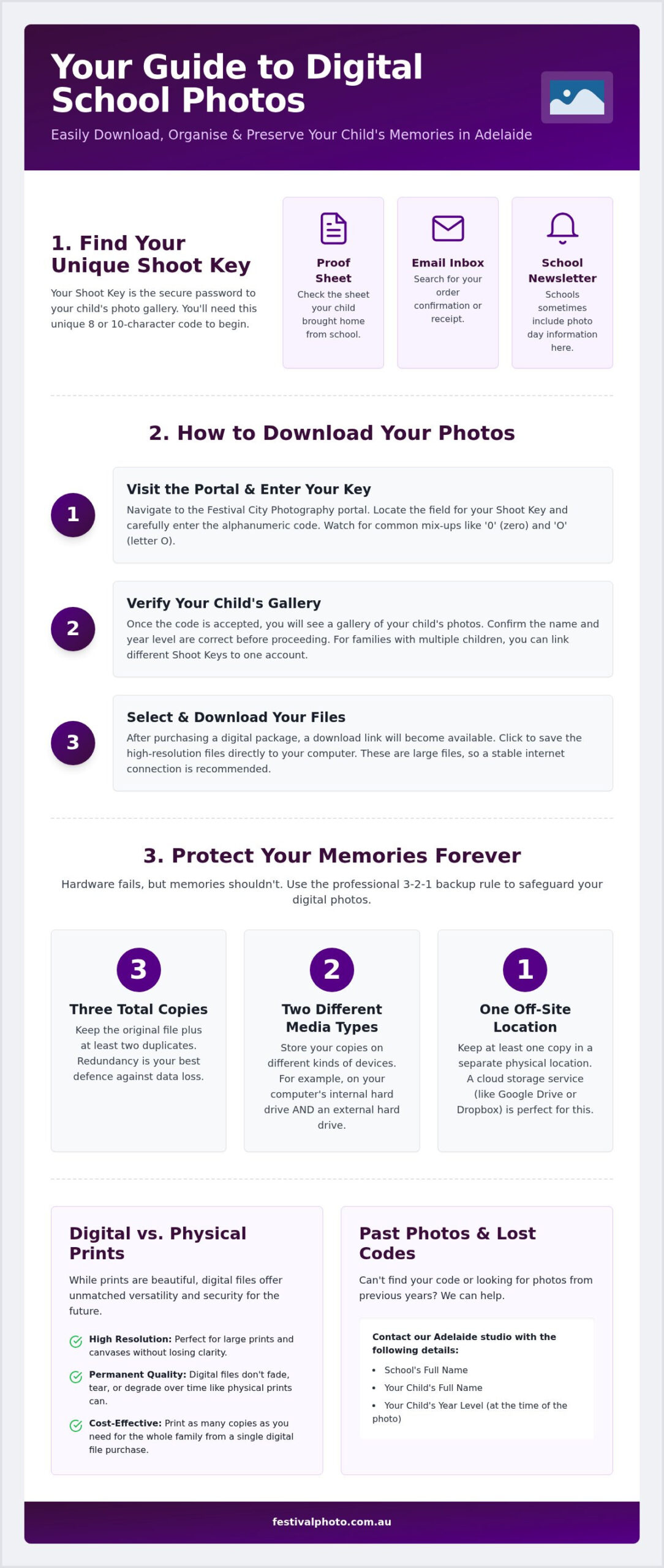
Your shoot key is the gateway to your child’s digital gallery. It’s usually a unique 8 or 10-character alphanumeric string printed clearly on the proof sheet your child brings home. If you’re looking for how to download digital school photos Adelaide families should first check the “Important Information” section of their school’s newsletter or their own email inbox for an order confirmation receipt. Knowing how to download digital school photos Adelaide students have taken starts with having this simple code at your fingertips.
These codes are a vital security measure. They ensure that only authorised family members can view and download specific student portraits. This aligns with broader school photography policies designed to protect student privacy in an increasingly digital world. By using a unique identifier for every individual portrait and sports team photo, we maintain a secure environment for your family’s memories. It’s a professional standard that provides peace of mind for parents and school administrators alike.
Retrieving Lost Access Codes in Adelaide
It’s quite common for a proof sheet to go missing between the classroom and the car, especially in Kindy. If the code is lost, don’t worry. You can contact our local Adelaide studio directly to request a reset. You’ll simply need to provide the school’s name, your child’s full name, and their current year level. For security reasons, we verify these details against our school-provided database before releasing any codes. Sometimes, you can even find recurring ID patterns on the back of prints from previous years if you’ve ordered with us before.
Managing Multiple Children and Sibling Codes
Organising memories for a large family requires a bit of structure. If you have children in different year levels or are looking for sibling school photos, you’ll receive separate shoot keys for each gallery. Most parents find it easiest to log into the Festival City portal and link these codes to a single master account. When entering your codes, be careful with similar-looking characters; the number “0” and the letter “O” are common points of confusion. Double-checking these alphanumeric strings ensures you land in the right gallery every time. Once linked, you can view all your children’s portraits in one place without needing to log in and out repeatedly.
Step-by-Step: How to Download Digital School Photos
Once you have your shoot key ready, the process of securing your child’s memories is straightforward. Begin by visiting the official Festival City Photography ordering portal. Unlike some internal school systems, our portal is designed for high-speed delivery and accessibility outside of restricted school networks. Understanding how to download digital school photos Adelaide parents receive requires a quick verification step; enter your unique code and you will immediately see your child’s student gallery. This secure environment allows you to review the portraits before committing to a final selection.
During the checkout process, you can choose between standalone Digital Image Files or bundles that include both prints and digital copies. If you are only ordering digital files, the transaction is often completed within minutes. After your order is processed, you’ll receive a “Download Ready” notification via email. This message contains a secure, direct link to your high-resolution files. A specific nuance for South Australian Department for Education families is that these photos aren’t stored within your school’s internal parent portal or “Edpass” system. You must use the link provided in our confirmation email to access the external, high-resolution server where your images are hosted.
Downloading on Mobile vs. Desktop
While it’s tempting to grab your photos on the go, your choice of device matters for long-term storage. On an iPhone, clicking the link usually opens the image in a browser where you must “Save to Photos” manually. Android users will typically find their files in the “Downloads” folder of their gallery. We strongly recommend performing your primary download on a desktop computer. Desktop systems handle the high-resolution ZIP files more reliably, making it easier to organise your permanent archives. If you’re using a tablet, ensure you have a file management app installed to extract the images from their compressed format without losing quality.
Technical Troubleshooting and Support
Technical hiccups can happen, but they’re usually easy to resolve. It is vital to remember that secure download links for high-resolution digital files expire 7 days after they are sent to maintain server security. If your link has lapsed, contact our Adelaide support team to have a fresh link generated. If the portal seems slow or images aren’t loading, try clearing your browser’s cache or switching from a school-managed device to a personal one. School firewalls can occasionally block external image servers. Ensure you have a stable internet connection before starting the download, as these high-resolution files are quite large and may fail if your Wi-Fi signal drops out mid-transfer.
Once you’ve mastered how to download digital school photos Adelaide families often wonder what the next step is to ensure those files don’t just sit in a cluttered “Downloads” folder. Successful preservation starts with a structured “School Years” folder system on your primary computer. Create a master folder for each child, then add subfolders labelled by year level, such as “2026 – Year 4” or “2026 – Kindy”. This simple act of organisation makes it easy to find specific portraits when you’re preparing for a Year 12 Graduation display or a milestone birthday slideshow.
We recommend following the industry-standard 3-2-1 backup rule to protect these assets. This means keeping three copies of your data: one on your local computer, one on a physical external drive, and one in a secure cloud storage service. This redundancy protects your child’s memories against hardware failure or accidental deletion. When sharing these high-resolution images with grandparents, avoid sending them via compressed messaging apps that strip away detail. Instead, use a private cloud link or a dedicated sharing service to maintain the file’s professional quality.
Printing Your Digital Files in Adelaide
Selecting the right paper is crucial for maintaining the artistic merit of a professional portrait. For school photos, a lustre or semi-gloss finish is often best as it reduces glare while maintaining vibrant colours. While you can use local Adelaide printing centres for quick copies, our digital image files are specifically colour-calibrated for professional-grade labs. This technical precision ensures the skin tones and school uniform colours appear exactly as our photographers intended. If you want a perfect match for your existing wall gallery, you can always order professional studio reorders directly through our portal.
Creative Ways to Use Digital School Photos
Your digital files offer endless creative possibilities beyond the traditional frame. You can design custom photo books that chronicle a child’s journey from their first day of Kindy to their final High School formal. These files are also practical assets for student CVs and extracurricular applications where a professional headshot is required. For a truly evocative project, try creating a time-lapse video. By using the consistent framing of our annual portraits, you can watch your child grow up in a matter of seconds, creating a powerful narrative of their educational journey.
Accessing the Adelaide Archives: Photos from Past Years
One of the greatest advantages of partnering with a local studio is the depth of our commitment to South Australian families. While national corporations often clear their servers at the end of a school term, our family-owned studio has acted as a trusted custodian for South Australian schools since 1990. If you’re wondering how to download digital school photos Adelaide studios have archived from previous years, the process is slightly different to a current-season order. We maintain extensive physical and digital records, meaning you can often retrieve portraits from 5, 10, or even 20 years ago.
There is a distinct difference between reordering a single physical print and purchasing a digital archive file. A print is a beautiful physical object, but a digital archive file is a versatile legacy asset. It allows you to reproduce the image for major milestones, such as a 21st birthday or a Year 12 Graduation ceremony, without worrying about the original print fading or becoming damaged over time. We take our role as custodians seriously, ensuring that the visual history of your child’s education remains accessible long after they have left the school gates.
The Archive Search Process
Retrieving a memory from deep storage requires a bit of detective work. Unlike current-year photos that are available for immediate download via a shoot key, archived images must be manually located by our local Adelaide support team. To begin this process, you can submit an archive search request directly through our website. Providing specific details is the key to a successful search. For example, knowing your child was in “Year 7 at Burnside Primary in 2018” allows us to pinpoint the exact digital negative much faster than a general name search.
To ensure a successful search, please have the following information ready:
- The full name of the school and the specific campus.
- The student’s full name as it appeared on the school roll at the time.
- The calendar year and the student’s year level (e.g., Kindy or Year 12 Graduation).
- Any details regarding specific sports teams or special events if applicable.
Turnaround times for these requests can vary. While current-year digital files are often available instantly, deep storage retrieval involves verifying data integrity and preparing a fresh, secure download link for you. This professional care ensures the file you receive is of the highest possible quality.
Securing Your Child’s Future Legacy
This archival service acts as a vital safety net for families. We’ve helped countless parents who have lost physical albums in house moves or through accidental damage. Knowing that a local Adelaide studio holds a secure backup of your child’s Kindy to Year 12 journey provides immense peace of mind. It’s about more than just a file; it’s about ensuring that your child’s educational legacy is preserved for the next generation to enjoy. Whether you are looking for a missing portrait or securing this year’s memories, we are here to help. Start your archive search or download your 2026 photos here.
Secure Your Child’s Digital Heritage Today
School photos are more than just items on a checklist; they’re the visual narrative of your child’s growth from Kindy through to their Year 12 Graduation. By mastering how to download digital school photos Adelaide families can ensure these high-resolution milestones are never lost to time or misplaced envelopes. You now have the tools to navigate our portal and establish a secure backup system that will last for decades.
Festival City Photography remains a proud, second-generation Adelaide family-owned business. With over 30 years of school photography excellence, we’ve built a secure, easy-to-use digital download system that prioritises your family’s privacy. Whether you’re archiving this year’s sports portraits or searching our deep archives for a missing memory, our local team is here to support you. It’s our privilege to help you capture and keep these moments.
Download your digital school photos from the Festival City portal and take the first step in protecting your child’s legacy. We look forward to helping you preserve these precious memories for years to come.
Frequently Asked Questions
How do I find my lost school photo shoot key?
Check your email inbox for an order confirmation or the school’s recent newsletter for community codes. If those searches fail, contact our Adelaide studio directly with your child’s full name, school, and year level. We verify these details against our secure database to ensure student privacy before reissuing any access codes. Our local support team is available during business hours to help you retrieve these vital credentials quickly.
Can I download my digital photos to my iPhone or Android?
Yes, you can download your portraits to any modern smartphone. On an iPhone, open the secure link in Safari and use the “Save to Photos” option to add the image to your library. Android users will typically find the file in their “Downloads” folder after clicking the link. While mobile access is convenient for social sharing, we recommend a desktop download for your primary high-resolution backup to ensure the best file integrity.
How long do I have to download my digital school photos?
Secure download links for high-resolution digital files expire 7 days after they are sent to your email. This policy is a security measure designed to protect student data on our servers. If your link has already lapsed, don’t worry. You can contact our support team to have a fresh link generated. We suggest downloading and backing up your files to a permanent storage device as soon as you receive the notification.
What if I want to download photos from a previous school year?
You can retrieve memories from past years through our archival search service. As a local Adelaide business established in 1990, we maintain extensive digital and physical records for South Australian schools. To begin a search, visit our website and provide the student’s name, school, and the specific year you require. Retrieving these files from deep storage takes a little longer than current orders, but it provides a wonderful way to complete your family’s collection.
Can I print my own copies from the digital file?
Absolutely, the high-resolution digital file grants you the flexibility to print as many copies as you need. These files are colour-calibrated for professional labs, ensuring excellent results at your local Adelaide photo centre. For the best quality, we suggest using a lustre or semi-gloss paper finish. This avoids the heavy glare of high-gloss prints while maintaining the vibrant colours and sharp details captured by our professional photographers during the school shoot.
Why is my shoot key not working in the portal?
If your code isn’t working, first check for common alphanumeric errors. The number “0” and the letter “O” are frequently confused, as are the number “1” and the letter “I”. Ensure there are no accidental spaces before or after the code. If the problem persists, your school’s specific ordering window might have closed. In this case, contact our studio so we can assist you with how to download digital school photos Adelaide families need for their records.
Is there a limit to how many times I can download the file?
There is generally no strict limit on the number of times you can click your secure link within its active seven-day window. However, the link is intended for your personal use to transfer the file to your primary devices. Once you’ve successfully saved the image to your computer or cloud storage, you won’t need the link again. We encourage parents to save the file immediately to avoid any issues if the link expires.
What is the resolution of the digital school photo download?
We provide high-resolution digital image files that are suitable for large-format printing. These files contain significantly more detail than the low-resolution previews shown in the online gallery. This professional standard ensures you can print your child’s portrait on a large canvas or include it in a high-quality photo book without any pixelation. It’s the same quality we use for our own professional print packages, giving you total creative control over your memories.