
A school directory feels more welcoming when readers can put faces to the names behind its governing council. Clear school governing council directory headshots in Adelaide help families recognise council members and introduce the people who support the school community, teaching and learning. The portraits work best when they look professional while still reflecting each person and the school’s character.
It’s understandable to want consistent images without making every person look interchangeable. This guide explains how to plan headshots for a school governing council directory, from preparing for portraits to choosing a background and presenting images alongside names and roles. Thoughtful photography can make a directory feel more personal and give readers a clearer sense of the community represented by its council.
Key Takeaways
- For a missing or outdated council portrait, direct your request to the school so it can be handled alongside the directory’s names and role details.
- Use the South Australian Department for Education directory to find school and preschool listings, but distinguish those listings from a council member directory.
- Check the school’s own pages for information about its community, programs and values when considering how directory portraits should represent it.
- Explore how Sibling Photos can sit within a school’s wider portrait offering, while keeping council directory images focused on introducing council members.
How can I request a missing or updated school governing council headshot?
Start with the school, which manages its council directory and member information. Use the school’s published contact details and direct your request to the office or governing council contact. For school governing council directory headshots in Adelaide, include the school name and where the directory appears. This gives staff a clear starting point, whether a portrait is missing or outdated.
Make the request specific. Identify the council member by their displayed name and role, such as chair or parent representative. If the portrait is missing, say which directory entry needs an image. If it needs updating, explain what has changed, such as a member’s appearance or a newly supplied portrait. Avoid sending a general request that leaves staff to identify the entry themselves.
Include practical details in your first message:
- School: Use the school’s full name, not just a suburb.
- Member: Give the person’s name and council role as displayed.
- Directory location: Describe the page or section where the portrait should appear.
- Request: State whether the image is missing, old or attached for consideration.
- Reply details: Provide your name and a way for the school to respond.
For example, a parent might write: “The council directory shows Alex Smith as chair, but the portrait is missing. Could the school advise how to supply an updated image?” This identifies the entry and asks for a clear next step. If the request concerns another person, name that member rather than forwarding a message without context.
When supplying a replacement portrait, make the file and message easy to identify. Use a filename such as “Alex-Smith-council-portrait” instead of “image-final-new”. State who took the portrait and whether the member has agreed to its use. The school can then consider the image against its directory format and publishing process.
Keep the request courteous and focused on the correction. Don’t include unrelated concerns about council decisions, enrolments or school programs in the same message. A separate, clearly stated request helps staff understand whether you’re asking for an image update or raising another matter. If the member has left the council, say so; the directory may need a name or role update too.
Before sending, review the school name, member’s spelling and role, and the attached file. A message about “Alex Smith” won’t help if the directory lists “Alexandra Smith” and the role has changed. Ask the school to update the relevant entry rather than assuming a submitted portrait will be published automatically. The school can assess the image and coordinate any related directory changes.
Keep a copy of your request and note when you sent it. If the directory still shows the old entry, reply to the same message with the school name and member’s role. This keeps the follow-up connected to your original request. Council members seeking an update can follow the same steps: identify the listing, provide the intended portrait and explain the change.
Are there official South Australian Department for Education pages listing school governing councils?
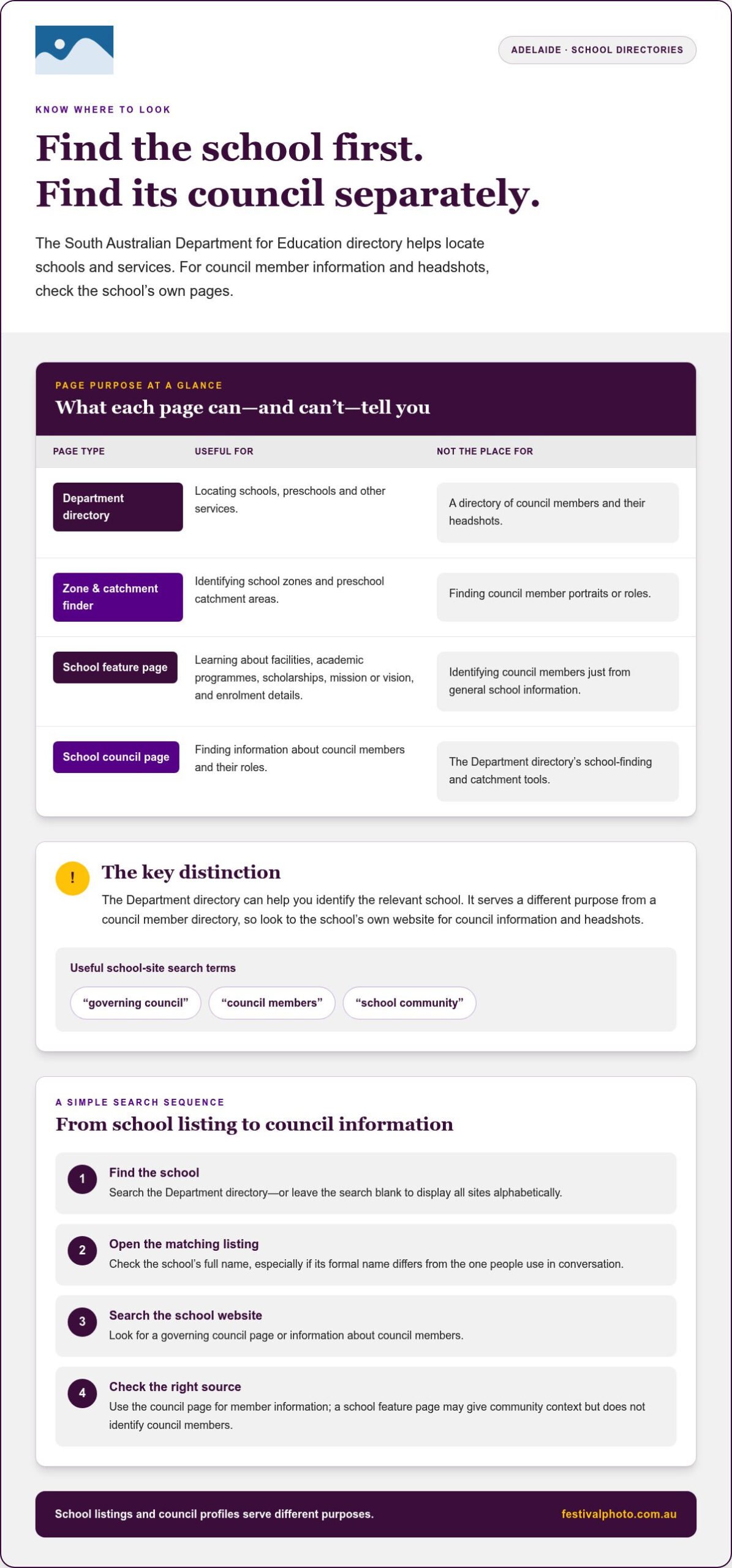
The South Australian Department for Education directory lists schools, preschools and other services. It helps readers locate a school, but it serves a different purpose from a directory of council members and their headshots. Use the official directory to find the relevant school, then look for council information on the school’s own pages.
Leaving the directory search blank displays all sites alphabetically. This is useful when you know the school name but aren’t sure how it appears in search results. Scan the A-to-Z list and open the matching listing. For example, finding an Adelaide school may be less straightforward if its formal name differs from the name people use in conversation.
The directory also has a finder for school zones and preschool catchment areas. These tools answer location and enrolment questions, not questions about governing council members. If you’re looking for a council headshot, use the school listing to identify the school, then search its website for terms such as “governing council”, “council members” or “school community”.
Keep the purpose of each page in view:
- Department directory: Locates schools, preschools and other services.
- Zone and catchment finder: Helps identify school zones and preschool catchment areas.
- School feature page: May describe facilities, academic programs, scholarships, mission or vision, and enrolment details.
- Council page: Is the relevant place to look for information about members and their roles.
A school’s feature page can provide context before you look for council information. A page describing the school’s mission or academic programs, for instance, may explain the community and teaching priorities its governing council supports. Details about facilities and scholarships can also help families understand the school. However, they don’t identify council members.
Use a simple search sequence to avoid confusing a school listing with a council profile:
- Search the Department directory for the school, or leave the search blank and browse alphabetically.
- Open the matching site listing and note the school’s full name.
- Search that school’s website for its governing council page or member information.
- Compare the name and role on the council page with the person you’re trying to identify.
Names matter. A school may use its formal title on its website, while families use a shorter name in conversation. Searching the full school name can narrow the results. If several schools have similar names, the Department directory can help you identify the right school before you look for its council information.
For example, St Michael’s College is an Adelaide Catholic school in the Lasallian tradition. That description gives readers useful background, but it doesn’t establish that the school has a governing council headshot directory. Treat school identity, council details and portrait listings as separate information, even when they appear on pages linked from the same website.
In short, use the Department directory to locate South Australian education sites, not as a substitute for a school’s council page. The school’s feature pages can provide context about facilities, programs, scholarships, mission, vision and enrolment. For a missing portrait or member listing, look for the school page specifically about its governing council.
A school’s formal title often differs from the everyday name used in conversation. That difference is worth keeping in mind when reviewing a listing: it can provide practical operational details without serving as a roster of council members. Aberfoyle Hub Preschool in South Australia lists three-year-old preschool as available from 2029, while Acacia Kindergarten in South Australia lists three-year-old preschool as available from 2028. Adelaide Miethke Kindergarten in South Australia lists three-year-old preschool as available from 2030. These entries illustrate that a directory result may answer questions about services and timing, rather than who sits on a governing council.
Other forward-looking information can also appear alongside school and preschool details. A Strathalbyn campus in South Australia is planned to open in 2029. Such information can help families understand what a site listing covers, but it should not be treated as evidence that the Department page provides individual council names or headshots. For that, check the school’s own governing council material, and confirm that the page identifies the relevant school and describes the role or membership being sought. If a listing leaves a detail unclear, use its school name as the starting point for a targeted search rather than assuming the directory entry is a complete profile. This keeps service, location and development information separate from council identification.
Festival City Photography: Sibling Photos
Festival City Photography offers Sibling Photos for school communities wanting to capture brothers and sisters together. These portraits serve a different purpose from council directory headshots: they celebrate family connections rather than introduce council members and their roles. Schools can include Sibling Photos alongside Individual Portraits or Class Group Photos to create a broader record of students and their school years. The right choice depends on what the school wants to document and who the images are for. Choose council portraits to help readers recognise council members, or sibling portraits to celebrate students’ family connections within the school community. To discuss school photography in Adelaide, contact Festival City Photography or visit festivalphoto.com.au.
Make the directory a welcoming first impression
A school directory is often one of the first ways families meet the people and values behind a community. Thoughtfully planned school governing council directory headshots in Adelaide can make that introduction clear, considered and connected to the school’s identity. Start by deciding how portraits will sit alongside names and roles, and what impression the directory should leave.
For broader school photography, Festival City Photography offers Sibling Photos, Individual Portraits and Class Group Photos. Each serves a different purpose, from celebrating family connections to presenting students individually or as a class. Consider which images best reflect your school community and the stories you want its photographs to tell.
When you’re ready to discuss photography for your school, contact Festival City Photography. A thoughtful approach can help your directory feel more personal and welcoming.
Frequently Asked Questions
Do South Australian public schools publish governing council member photos?
Some school websites include council member photos, but the South Australian Department for Education directory helps users locate schools, preschools and other services, not browse council headshots. Look for a council page or profile on the specific school’s website. A school might list members’ names and roles without portraits, so use the published details to identify the right person before making an enquiry.