
The best child care photo package isn’t necessarily the one with the most products. When comparing Burnside child care centre photo packages Adelaide, start with what will make photo day straightforward for educators, give families clear ordering options and help children feel at ease. Knowing what to expect makes it easier to choose an approach that suits your centre.
This guide explains how to compare photo types and formats, from individual, sibling and class group photos to prints and digital image files. It also covers practical planning and ordering steps, including how families access a protected online gallery and place an order.
Festival City Photography brings over 30 years’ experience in school and event photography to kindy photo days in Adelaide. Prints are produced in-house on high-quality ‘lustre’ paper. Use the guidance below to plan photo choices, prepare families and fit photography around the centre’s daily routine.
Key Takeaways
- Compare photo types, formats and ordering steps against the keepsakes families are likely to value.
- For Burnside child care centre photo packages Adelaide, identify your centre’s photo needs before considering individual choices.
- Give families clear photo-day details and practical ordering instructions in one place.
- Explain how families can access the relevant gallery and view and order images.
- Consider Festival City Photography’s education photography experience when planning a photo day for children, families and educators.
Why Burnside child care centre photo packages need to work for families and staff
A centre’s first task is to shape a photography plan that suits the children, gives families useful choices and fits the rhythm of the day. For Burnside centres serving families across Adelaide’s eastern suburbs, that means thinking beyond the finished photograph. Decide which photo types will be available, how the centre will coordinate the day and what parents need to know to view and order images.
Families may value different keepsakes. One parent might want an individual portrait, while another may prefer a class group or sibling photo. Some families may choose a print; others may want a digital image file. Explaining each option in plain language helps parents decide what suits their household, without asking the centre to recommend one selection for everyone.
The centre organises the photography experience, while each family chooses what to order. You can plan for individual, class group and sibling photography, then share consistent information about accessing and ordering images. Festival City Photography’s online galleries let families view and order prints, digital files or souvenir photographic products. Keeping the centre’s arrangements separate from each family’s selection makes the process easier to explain.
What should a child care centre’s photo package make easy?
It should make the choices easy to understand. A family notice can name the photo types, explain what each captures and set out how families will receive ordering information. Individual portraits feature each child, class group photos record their room or group, and sibling photos bring enrolled brothers and sisters together. Straightforward descriptions help parents compare these keepsakes and decide which images matter to them.
Clear information also helps staff coordinate. Centre leaders can prepare families, while educators can help organise children in a way that fits the day’s routine. When everyone understands the plan and their role, photo arrangements are less likely to prompt last-minute questions or disrupt the day.
Who is involved in choosing child care photos?
Centre leaders shape the arrangements by deciding what information families need and how photo day fits the centre’s operations. Educators know the children and daily routine, so their input can help with practical timing and transitions. Parents make the personal choice about which images or products to order. This shared approach reflects the wider work of child care, where caregivers, families and the setting each have a role in supporting children.
For centres comparing Burnside child care centre photo packages Adelaide, consider whether the plan works for all three groups. Can families distinguish the available photo types? Can staff explain the basic steps without managing each order? Does the schedule respect the centre’s usual flow? Answering these questions helps make photography a well-organised occasion, while leaving families free to choose the keepsakes they want.
What to compare in Burnside child care centre photo packages
A useful comparison separates the photographs families may want from the formats and ordering steps available to them. Check the details of the specific offer rather than assuming it includes a particular number of images, products or a delivery timeframe. For Burnside child care centre photo packages Adelaide, a clear comparison helps centres describe choices accurately and families compare like with like.
A useful photo package makes it clear which keepsakes families can choose and how they can view or order them.
| Photo type | Format to compare | Ordering detail | Possible keepsake |
|---|---|---|---|
| Individual portrait | Printed product or digital image file | How families access the image and place an order | A portrait of one child |
| Class group photo | Printed product or digital image file | How the group image is presented in the gallery | A record of the child’s class or group |
| Sibling photo | Printed product or digital image file | How families find and select the sibling image | A shared portrait of siblings |
| Kindy photo | Compare the available printed and digital choices | Review the gallery and ordering instructions | A keepsake from a kindy year |
Use the table as a comparison guide, not as a promise that every photo type is bundled together or offered in a particular quantity. Keep package descriptions specific to the products available, and explain any inclusions and prices clearly. That way, families can make an informed choice without mistaking an example for a fixed package.
Which photo types may matter to a centre and its families?
Each category captures a different memory. Individual portraits focus on one child, while class group photos preserve a sense of their learning community. Sibling photos bring enrolled brothers and sisters together, and kindy photos mark a particular stage of early learning. Use these categories to explain what families can choose, without implying that every family will want every type.
How should centres compare print and digital options?
A print is a physical keepsake; a digital image file is delivered for download. Festival City Photography produces prints in-house using its professional photographic processing labs, on high-quality ‘lustre’ paper. Website gallery images are watermarked. High-resolution and Facebook-low-resolution digital downloads, along with all prints, are supplied without watermark. Digital download links expire in 7 days, so families should save their files promptly.
Gallery access requires an email address and event password, or a request for an access code. Once in the gallery, families can view images and order prints, digital files or souvenir photographic products. If your centre is planning kindy portraits alongside group or sibling photos, these format details can help make the family information practical and precise. Explore kindy photo options as part of planning the choices to communicate.
How to assess package fit, ordering and family access
A package is practical when families can understand how to find their images and complete an order. For Burnside child care centre photo packages Adelaide, assess the family journey as well as the photo types: identify the centre’s needs, compare print and digital formats, understand gallery access and payment, then prepare clear instructions. This lets centre staff share consistent information without taking responsibility for each parent’s selection.
- Identify photo needs. Decide which photo types suit the centre and its families.
- Compare formats. Explain the difference between printed products and digital image files.
- Review ordering. Understand how families access the gallery, choose products and pay.
- Plan communications. Give families the access details and ordering steps in one clear notice.
For School Class Photo orders, families select the school, enter the student’s last name, choose the student or students, then continue to package selection and payment. Payment is by PayPal or credit card, and student packs are delivered to the student’s school. Share the relevant instructions with families so they know how to locate images and complete their order. Orders are processed only after full payment is received.
What should families know about viewing and ordering images?
Families log in, select the relevant year and gallery, then enter an email address and event password. If they need gallery access, they can request an access code. A password-protected gallery is for invited viewers, not public browsing. Website images let customers view and order prints, digital image files or souvenir photographic products.
Make these steps easier to follow by sharing the event details with the ordering instructions. Parents should know which year and gallery to select, what access information they need and where to request an access code. Clear directions help families move from viewing images to choosing products without relying on staff to guide each order.
What should families know about digital downloads and Family Packs?
A digital download link expires in 7 days, so families should download their files promptly. Downloaded files are supplied as a ZIP containing the image and a text file with licensing terms. Families need an unzip utility, such as Win-RAR, to extract the files. Website preview images are watermarked; high-resolution and Facebook-low-resolution downloads are supplied without watermark.
Family Pack orders follow a specific sequence: pay for each individual pack first, then return to the School Class Photo payment page, select the oldest student and choose “Pack E” to complete payment for the Family Pack. Include these steps in family communications rather than assuming that one Family Pack selection automatically covers individual packs.
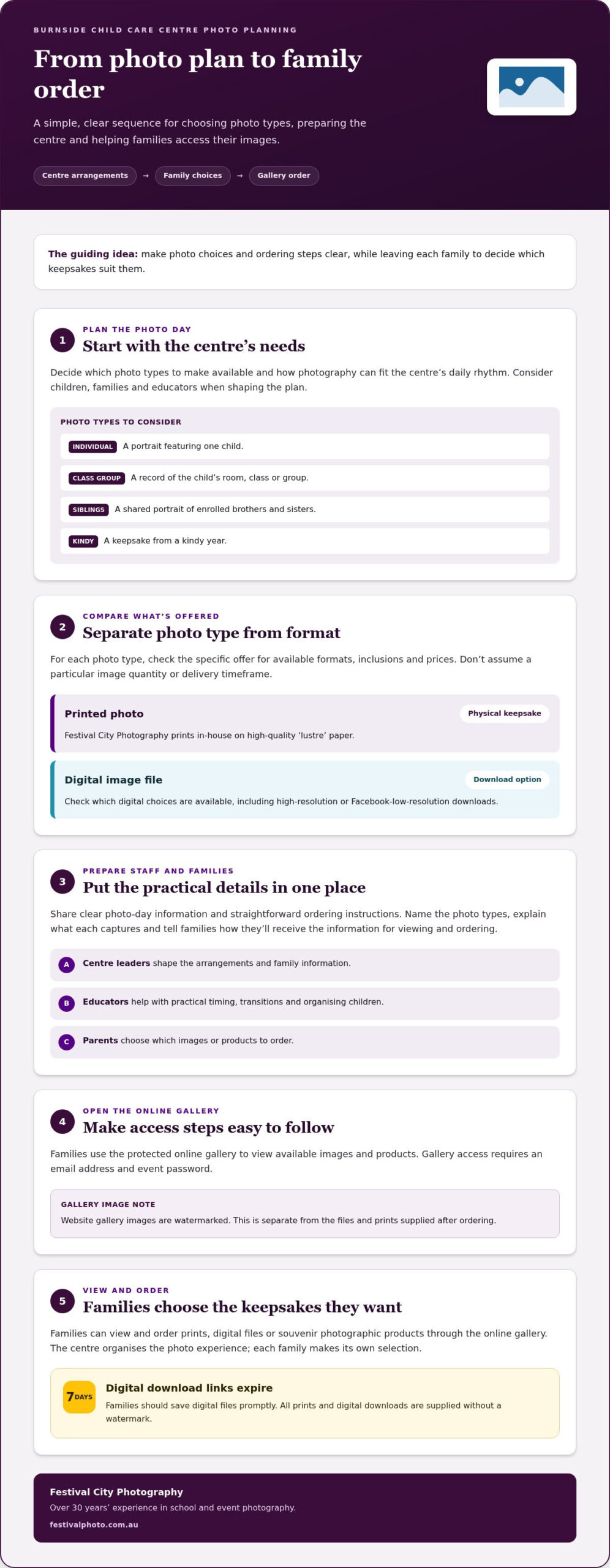
How to plan a smooth child care centre photo day in Adelaide
A considered plan starts with the centre’s needs, then makes the day and follow-up information easy for educators and families to understand. For Burnside child care centre photo packages Adelaide, use familiar routines to guide practical decisions and keep information consistent. This helps the photography arrangements fit into the centre’s day.
Before photo day, centre leaders can work through a simple sequence:
- Choose the photo categories. Decide whether individual portraits, class group photos, sibling photos or kindy photos suit the centre.
- Consider the daily routine. Use the centre’s existing rhythm to plan how photography fits into the day.
- Coordinate the team. Share relevant details with educators so they understand the plan and can support children through the usual routine.
- Prepare family information. Explain the photo types, how families will receive access and ordering details, and where to request an access code.
When sibling portraits are being considered, a sibling school photos guide can help families understand the purpose of this photo type alongside kindy or class images. Keep the centre’s family notice focused on its own photo-day arrangements, rather than assuming every family will choose the same images.
What can centre teams organise before photo day?
Agree on the photo categories first, then describe them in plain language in the family notice. Decide how day-of information will be shared with educators and how updates will reach families. Let the centre’s usual routines guide the practical plan, so staff can coordinate without unsupported promises about exact timings or changes to established arrangements.
How can centres make ordering clearer after photo day?
Bring the essential details together in one message: gallery access steps, the event password or how to request an access code, payment information and the products families can view and order. Put the instructions in order, and distinguish digital image files from prints. Families choosing downloadable school photos may also find a digital image files guide useful.
If communicating about student packs, state plainly that they’re delivered to the student’s school. For other orders, explain the relevant family steps without implying that products are delivered to the centre. Accurate, focused instructions help parents act independently and reduce the need for educators to interpret ordering details.
A clear notice can set out the photo categories, how to access the gallery, how to place and pay for an order, and where to request an access code. Before sending it, make sure the details match the photo-day arrangements and that the wording is easy to follow. To plan kindy, sibling or class photography with an experienced education photography team, get in touch with Festival City Photography.
Choose Festival City Photography for child care centre photos in Adelaide
Choosing a photography partner means considering both the images families can keep and the practical work involved in arranging photo day. Festival City Photography is a second-generation, South Australian family-owned business with over 30 years’ experience in school and event photography. Its education photography experience supports clear arrangements for centres and families.
For Burnside child care centre photo packages Adelaide, relevant options include kindy photos, individual portraits, class group photos and sibling photos. Each captures a different part of a child’s early learning community, from an individual portrait to a shared class or sibling keepsake. Centres can consider which photo types suit their families without assuming they must be grouped into one fixed package.
Families can view images online and order prints, digital image files or souvenir photographic products. Festival City Photography produces prints in-house using its professional photographic processing labs, on high-quality ‘lustre’ paper. This gives centres a clear detail to share when explaining the difference between a physical print and a digital file.
What does Festival City Photography bring to education photography?
Education photography calls for an approach that respects the centre’s routines while creating portraits and group photographs families can keep. Festival City Photography’s experience spans school and event photography, alongside kindy, individual, class group and sibling images. As a South Australian family-owned business, it brings a local perspective to working with education communities. The aim is simple: “Let us put you in the picture.”
In-house print production is another practical detail. Festival City Photography produces prints using its own photographic processing labs, rather than a third-party print service. For families choosing a physical keepsake, the prints use high-quality ‘lustre’ paper. Centres can share these details while describing package inclusions and family choices accurately.
How can a centre take the next step?
Start with the centre’s priorities: which photo types would serve its community, what choices families should be able to make, how ordering information will be shared, and whether prints, digital files or both are relevant. Bringing these points together gives you a useful starting brief for discussing your centre’s photography needs.
Explore Festival City Photography’s education photography services and discuss the arrangements that matter to your centre. Call 1300 360 241 or email jess@festivalphoto.com.au.
Start shaping your centre’s next photo day
A photo day can become a meaningful part of your centre’s year, capturing children’s changing personalities and the relationships that make up its community. Start with a plan that feels considered for children, practical for educators and straightforward for families.
As you explore Burnside child care centre photo packages Adelaide, think about what you’d like families to remember from this year. A portrait, a class photo or a sibling image can each tell a different part of that story. A clear sense of your centre’s priorities gives the discussion a useful starting point, while leaving families free to choose their keepsakes.
Festival City Photography is a second-generation, South Australian family-owned business with over 30 years’ experience in school and event photography. Its prints are produced in-house on high-quality ‘lustre’ paper. Explore Festival City Photography’s education photography services and share what matters to your centre to start planning your next photo day.
Frequently Asked Questions
What should a child care centre photo package include?
A useful package makes the available photo types and product formats clear, rather than leaving families to guess what a bundle contains. For Burnside child care centre photo packages Adelaide, Festival City Photography offers kindy photos, individual portraits, class group photos, sibling photos, prints and digital image files. Centres can describe these as separate choices, helping parents distinguish a class keepsake from a portrait or downloadable file.
Can families choose digital files as well as printed photos?
Yes. Festival City Photography offers digital image files and physical prints, so families can choose the format that suits how they want to keep their photographs. Save a digital file promptly after ordering because the download link expires in 7 days. If the file arrives as a ZIP, use an unzip utility such as Win-RAR to extract it.
How do parents access a protected photo gallery?
Parents log in, select the relevant year and gallery, then enter an email address and the event password to view the protected gallery. If they need an access code, they can request one. Website images allow customers to view and order prints, digital files or souvenir photographic products. Families can use the gallery to find the relevant images before deciding which product to order.
Are Festival City Photography’s prints produced in Adelaide?
Festival City Photography produces prints in-house using its own professional photographic processing labs. The prints use high-quality ‘lustre’ paper and are supplied without a watermark. Website images are watermarked, while high-resolution and Facebook-low-resolution digital downloads are supplied without a watermark. This distinction helps parents understand the difference between a gallery preview and a purchased print or file.
How does a Family Pack order work?
Pay for each individual pack first. Then return to the School Class Photo payment page, select the oldest student and choose “Pack E” to complete payment for the Family Pack. Student packs are delivered to the student’s school. Follow the stated sequence for the Family Pack payment after paying for the individual packs.
When are photo orders processed and how are customers charged?
Orders are processed only after full payment is received. Customers can pay by credit card or PayPal, and a tax invoice is emailed to the customer. Centre communications should give families the payment information relevant to their photo event and avoid implying a particular package price or delivery timing.